


The 4 Types of Professional Time

Today at a Glance
What’s a Rich Text element?
The rich text element allows you to create and format headings, paragraphs, blockquotes, images, and video all in one place instead of having to add and format them individually. Just double-click and easily create content.
Static and dynamic content editing
A rich text element can be used with static or dynamic content. For static content, just drop it into any page and begin editing. For dynamic content, add a rich text field to any collection and then connect a rich text element to that field in the settings panel. !
- ml;xsml;xa
- koxsaml;xsml;xsa
- mklxsaml;xsa
How to customize formatting for each rich text
Headings, paragraphs, blockquotes, figures, images, and figure captions can all be styled after a class is added to the rich text element using the "When inside of" nested selector system.
A few years ago, I noticed a struggle in my professional life:
I'd end the day drained, but when I looked back, I was unable to point to a single thing that I'd meaningfully moved forward.
I started convincing myself that I wasn't working enough. I needed to work harder. Do more. Grind.
But that got me nowhere, because it turns out, it was entirely wrong.
The problem wasn't how much I was working. It was the type of work that filled the day.
To solve that problem, I created a simple model that changed the way I work:
Deconstructing Professional Time
I believe there are four types of professional time:
- Management
- Creation
- Consumption
- Ideation
I'll walk through each to explain it more clearly.
1. Management Time
Most people spend the majority of their professional lives here.
Typical activities include:
- Meetings
- Calls
- Presentations
- Email processing
- Team and people management
- General coordination
It looks (and feels) like productivity. And it matters, because things tend to fall apart without it.
But it also has a tendency to expand and consume all of your time. Bleeding into every open space on your calendar.
Management Time can quietly shift from real productivity into performative productivity. A focus on movement over progress.
2. Creation Time
The second most common type of professional time. It's usually what you scramble to jam into the gaps between Management Time blocks.
Typical activities include:
- Writing
- Coding
- Building
- Designing
- Analyzing
This is where real progress is unlocked, but it's usually the first thing that gets crowded out, relegated to the thin windows that remain after Management Time.
3. Consumption Time
The first of two forgotten types of professional time. It's often forgotten because it's about input, not output, so it's easy to cut when the calendar gets tight.
Typical activities include:
- Reading
- Listening
- Studying
The things you create are a natural byproduct of the things you consume.
Your consumption "diet" establishes your creation capacity. Garbage in, garbage out. Quality in, quality out.
4. Ideation Time
"All of humanity's problems stem from man's inability to sit quietly in a room alone." - Blaise Pascal
Ideation is the second of two forgotten types of professional time. It's often forgotten because it has no input and no output. It's just thinking.
Typical activities include:
- Brainstorming
- Journaling
- Walking
- Reflecting
Most of us have zero room for stillness in our working lives. We're too busy producing to think.
The hard work may create linear progress, but non-linear outcomes are a result of slowing down. The non-obvious idea, the better question, the a-ha moment. All of the 10x opportunities sit on the other side of the stillness you're avoiding.
Establishing Your Baseline
Before you can improve your balance of professional time, you need to understand your starting point.
Here's the simple exercise I built to map my own:
For one week, at the end of each day, color-code every block on your calendar according to its dominant type:
- Management: Red
- Creation: Green
- Consumption: Blue
- Ideation: Yellow
An example illustrative calendar might look like this:
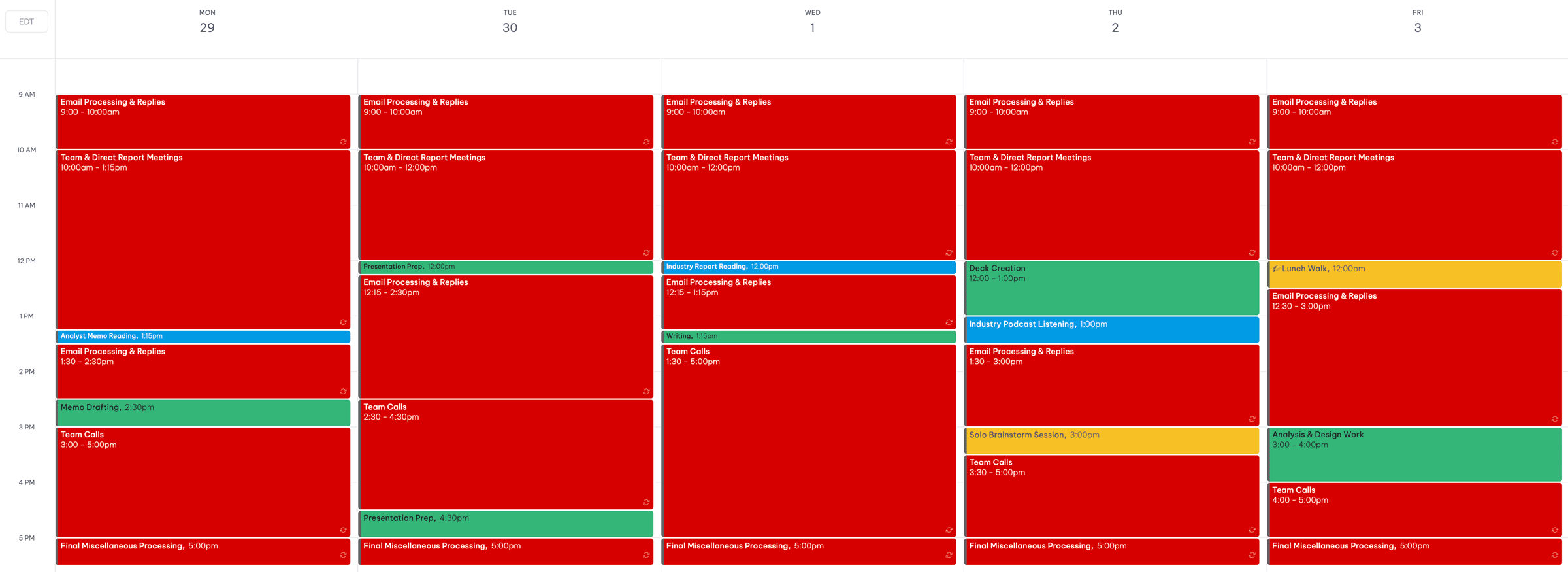
At the end of the week, step back and look at the big picture:
- What color dominates your calendar?
- Are there any real windows for Creation?
- What about for Consumption or Ideation?
- Is there a clear rhythm to the days or is it randomly scattered?
Most people are stunned by how much red they see, and by how little space they have for everything else.
With your baseline in hand, here are a few steps to improve it...
3 Steps for an Optimal Balance
Step 1: Batch Management Time
Parkinson's Law is an idea that work expands to fill the time allotted for its completion.
It was first proposed by British naval historian Cyril Northcote Parkinson in a satirical essay in The Economist in 1955.
While originally intended as a humorous critique of bureaucratic inefficiency, the principle rings true:
- Have all day to process email, you end up emailing for the entire day. Have 30 minutes to process email, you crank through your entire inbox in a flash.
- Have months to complete an assignment, you procrastinate and it takes months. Have two days to complete an assignment, you work efficiently and get it done.
Management Time is a clear Parkinson's Law risk. It has a tendency to bleed out and dominate your days.
But that same risk can become an opportunity: You can leverage Parkinson's Law to your advantage.
Work towards a "batched" Management Time schedule:
Create discrete blocks of time each day when you'll handle major Management Time activities, like email, meetings, and general processing.
- 1-3 email processing blocks per day
- 1-3 call and meeting blocks per day
The goal here is to avoid a schedule where Management Time bleeds into every open space on your calendar. We're trying to keep the Management Time windows as discrete as possible to create space for the other types of time.
So, an illustrative calendar after adding Management Time blocks might look like this:
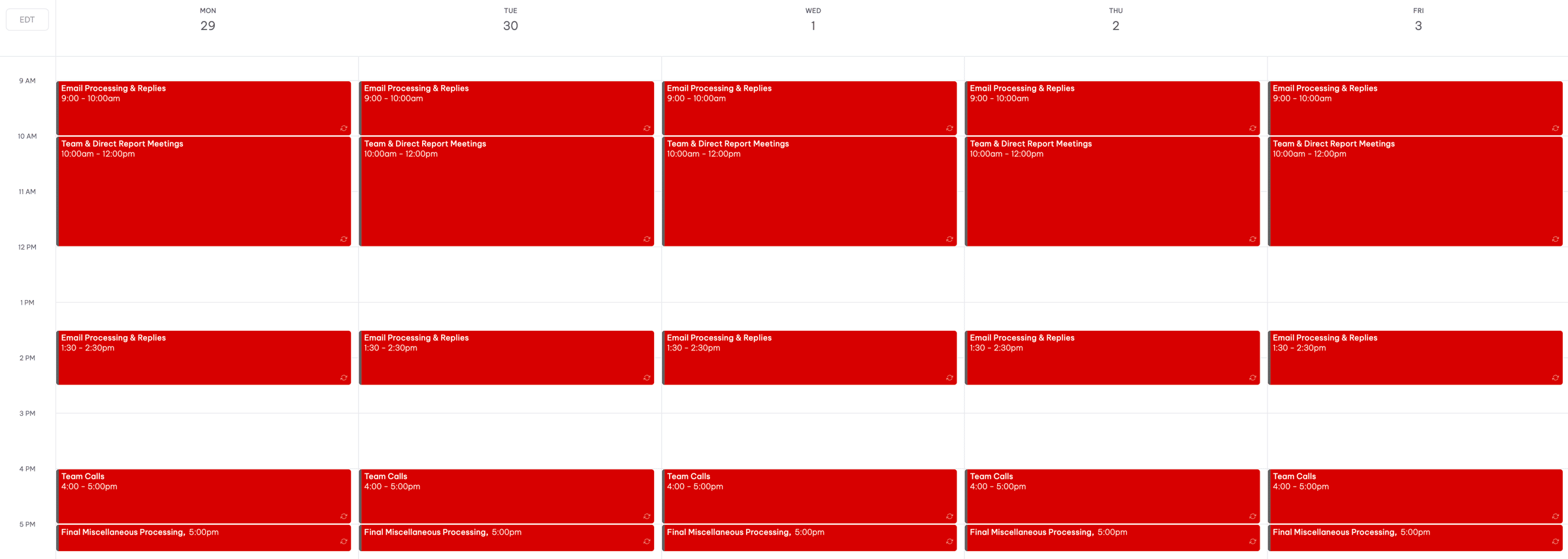
Note: Your ability to do this will scale with your career progress. If you're early, small batching wins count; if you're senior, you can be more ruthless.
Every hour of Management Time you contain will free you up for impactful work that actually moves you forward.
Which is where the next step comes in.
Step 2: Increase Creation Time
You just freed up space by batching Management Time. This is the primary place where that new space is invested.
To do this most effectively, aim to carve out distinct Creation Time windows on your calendar that are aligned to your energy.
The energy point is significant:
Trying to create at the very end of a long, tiring day may not be particularly conducive to robust, thoughtful output. Conversely, carving out Creation Time blocks in the morning or after a short afternoon walk is more likely to spark meaningful results.
Aim to block 1-2 discrete windows per day for Creation Time, ideally during periods when your energy is likely to be high.
Continuing to build on the same illustrative calendar, the addition of Creation Time in the early and mid-afternoon might look like this:
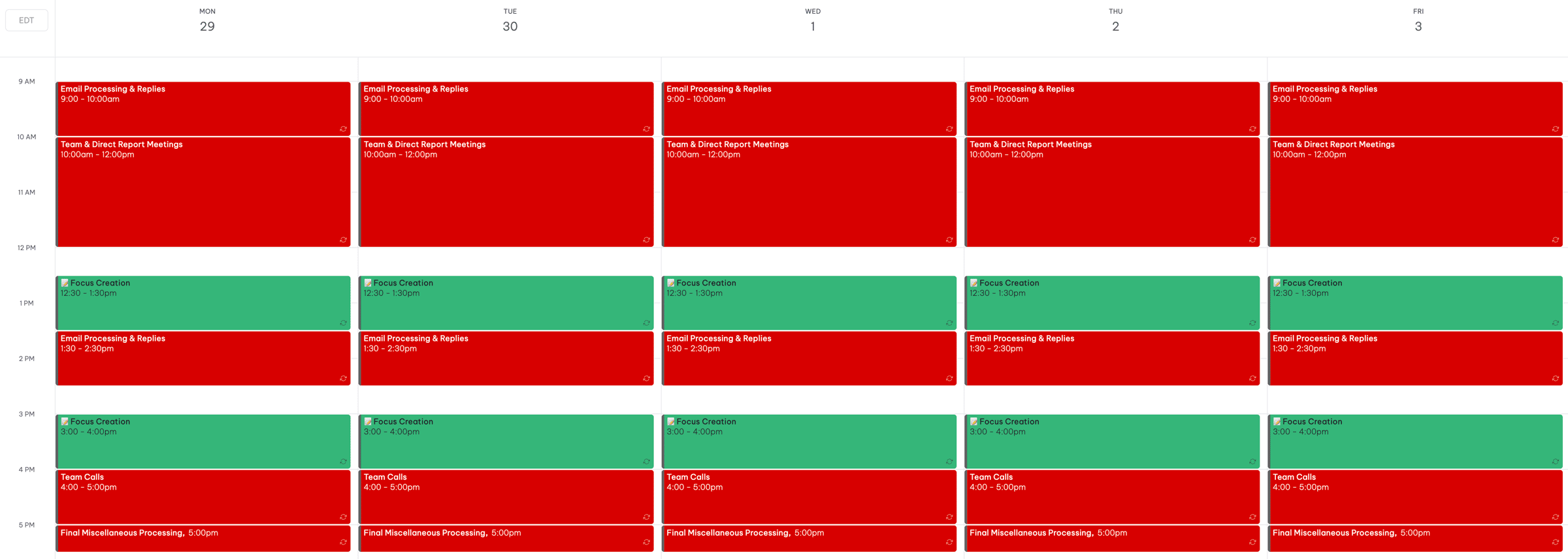
And once you have the block, protect it. No email, no Slack, no "quick checks" on other things. Creation Time is only as powerful as your ability to protect it from Management Time intrusions.
Step 3: Create Space for Consumption & Ideation Time
Both Consumption and Ideation are non-producing time, which means they're often the hardest to justify when your days get busy.
That said, they're both essential for generating the consistent, non-linear outcomes we're all after, so they need to be blocked and protected.
Aim to block one discrete short window per day for each of consumption and ideation.
Adding in our Consumption and Ideation blocks, the complete illustrative calendar looks like this:
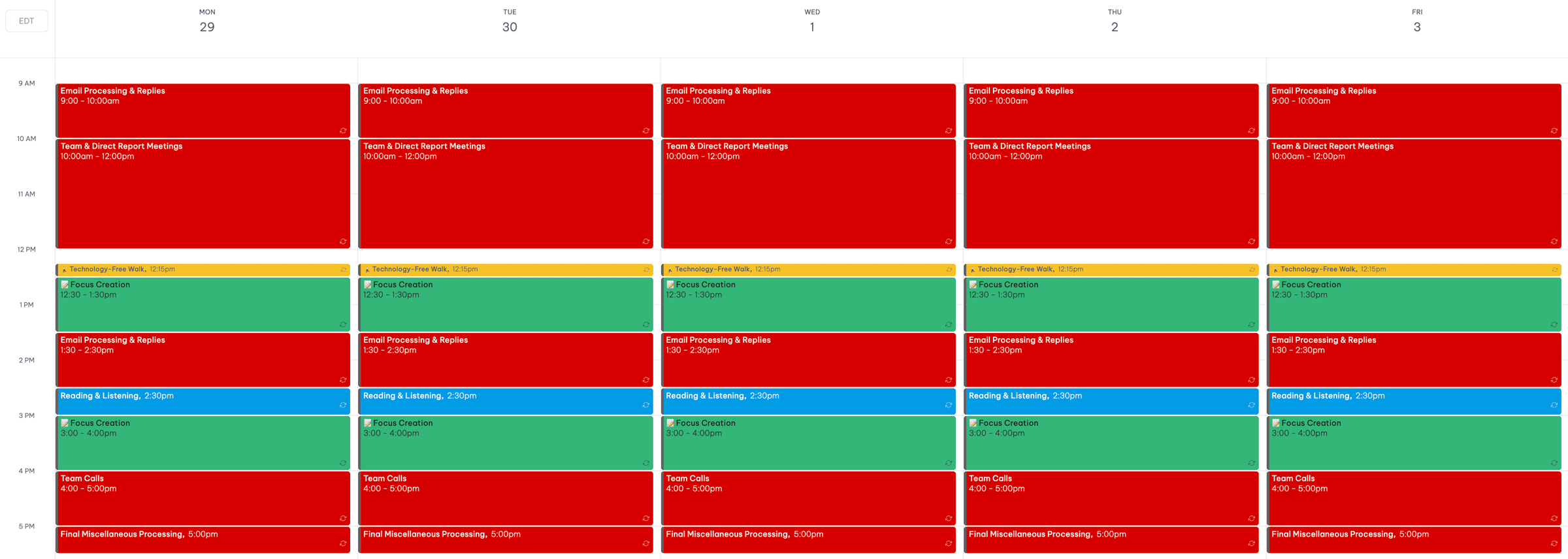
Note: This calendar is an idealized version with one short window per day for each of Consumption and Ideation. If that feels impossible, start small by scheduling one short block per week for each.
Now, each day has a balance across the four types of professional time:
- Batched Management Time
- Protected Creation Time
- Short, discrete windows for Consumption and Ideation Time
This is a calendar designed for real progress, not just movement. The goal is meaningful output, not impressive input.
If you feel stuck in your professional life, this model will help. Work through the calendar baseline exercise and three steps.
Identify your current mix of professional time. Then fix it.


